
Hipobuy first-order guide: seven steps with the official screens
From registration to signing for the parcel, each step shown with Hipobuy's own screenshots and tutorial images, plus the photo decisions this shortlist adds along the way.
Checked October 22, 2026Hipobuy's own walkthrough video
Hipobuy's official YouTube channel, @Hipobuy, holds one video: a 2 minute 15 second walkthrough published on March 5, 2025. Its cover lays out the route in five numbered chapters: register, how to find, submit order, select items from warehouse, and ship to you. Watch it once for the shape of the process, then use the seven steps below, which follow the same route step by step and add the photo decisions this shortlist is about.
The video loads only when you press play, and it comes from YouTube's privacy-enhanced player.
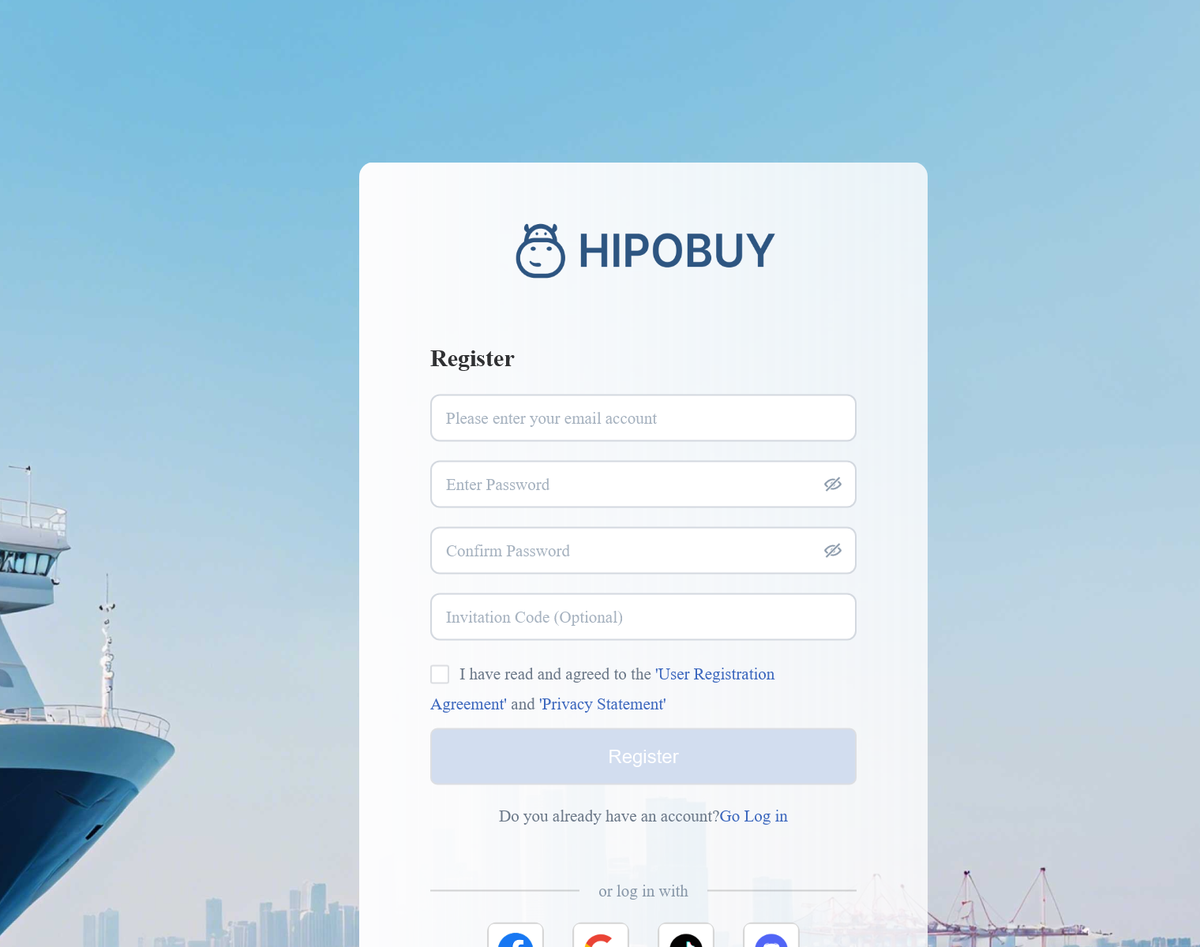
Make an account, invitation code optional
Hipobuy's register page asks for an email, a password typed twice and, optionally, an invitation code, plus a tick to accept its User Registration Agreement and Privacy Statement. You can also sign in with Facebook, Google, TikTok or Discord. Our links fill the invitation code with ours; you can clear it and the account works the same.
Set the currency in the site header to the one you think in, but keep an eye on the yuan figure as well. The costs page explains why the two can disagree by more than you would expect.
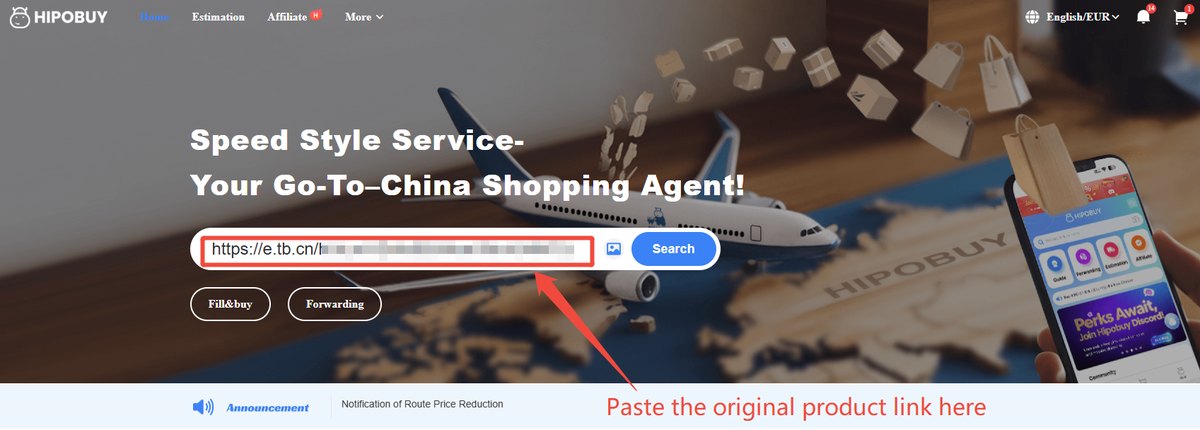
Paste the listing link or search
Hipobuy's search bar accepts three things: a listing link, a product name, or one of your Hipobuy order numbers. Paste a Taobao, 1688 or Weidian link and it opens the product inside Hipobuy, ready to order. Photo search sits beside the bar. For sellers it cannot search, such as Goofish or Yupoo pages, Hipobuy offers a manual form called Fill & Buy (DIY), where you type the product details yourself.
Every pick on this shortlist has an “Order it on hipobuy.com” button that opens the same Weidian item inside Hipobuy, so you can skip the copying.
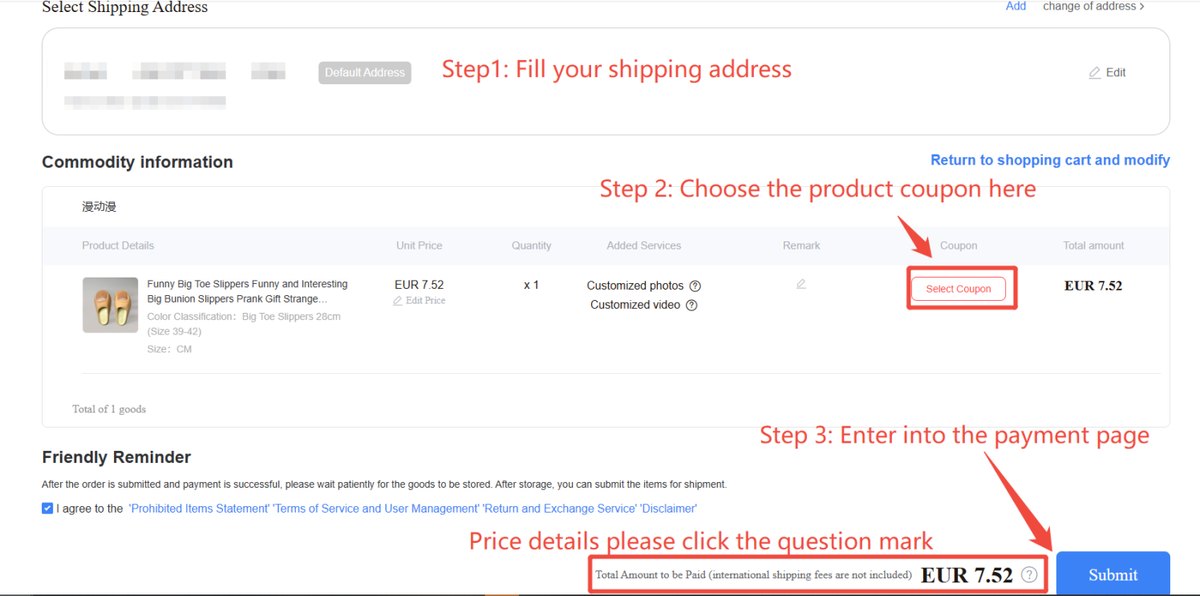
Pick the option, leave a message, pay
On the product page choose colour, size and quantity. Read the option names carefully; on this list alone we found pre-sale notes, a gift box and a phone contact sitting in option menus. Anything the buyer agent should know goes in the message box. This is also where the custom photo service sits, so add your measured shots or close-ups now rather than after the parcel arrives.
The confirmation page shows your address, a coupon selector and the total, with a reminder that orders go to Hipobuy's warehouse first. Pay with balance, card or PayPal, or combine balance with another method if the balance is short.
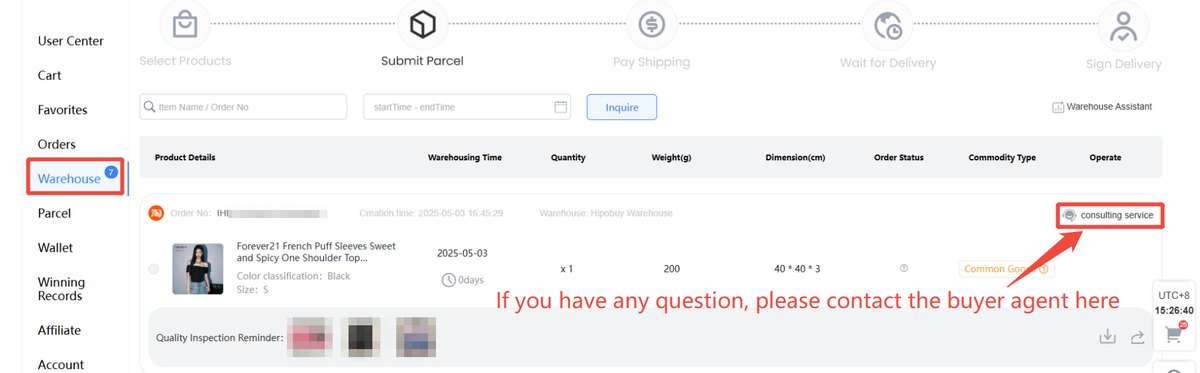
Warehouse arrival and the QC set
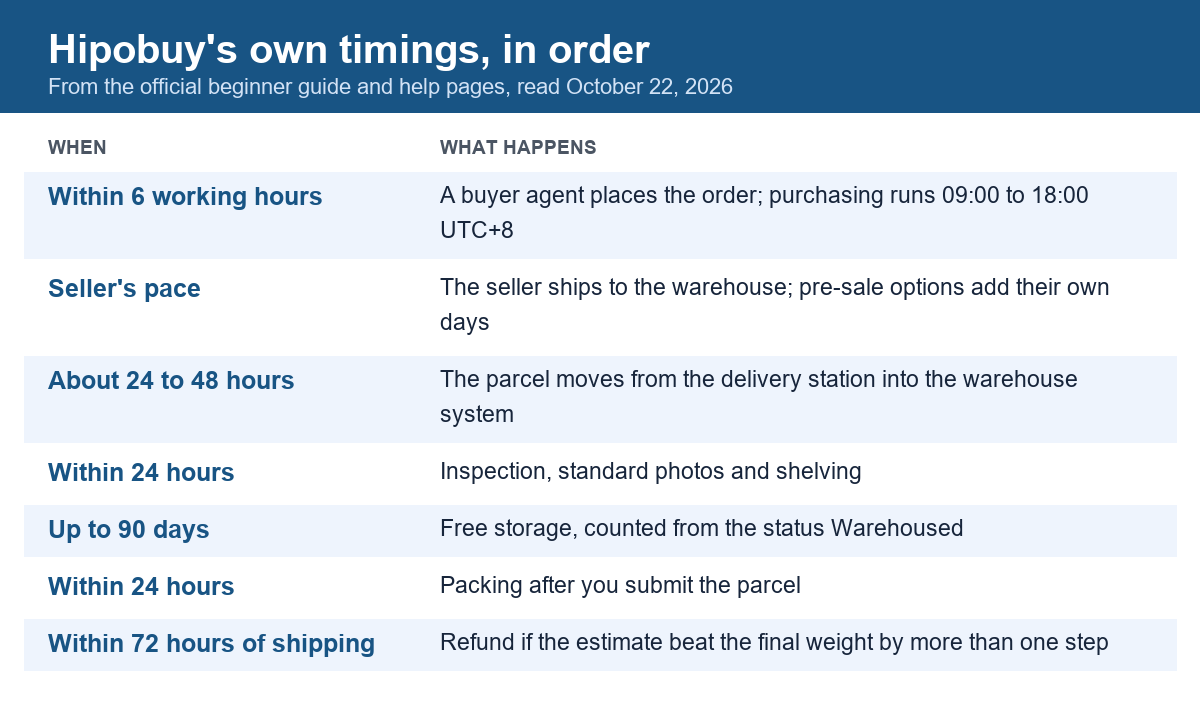
Hipobuy says its buyers place orders inside six working hours, and that buying runs on a nine-to-six day in UTC+8. The seller then ships to the warehouse at its own pace; pre-sale options add their own days. Hipobuy says parcels go from the warehouse delivery station into its system within about 24 to 48 hours, and that inspection and shelving follow within 24 hours.
The inspection photos appear on your Warehouse page under each item. This is the moment the shortlist was built for: compare the standard set and any extras against the notes on the pick's card. If something is wrong, Hipobuy's five-day return guarantee runs for 120 hours from the hour after the status turns to Warehoused, and only when the seller agrees.
Choose items for one parcel
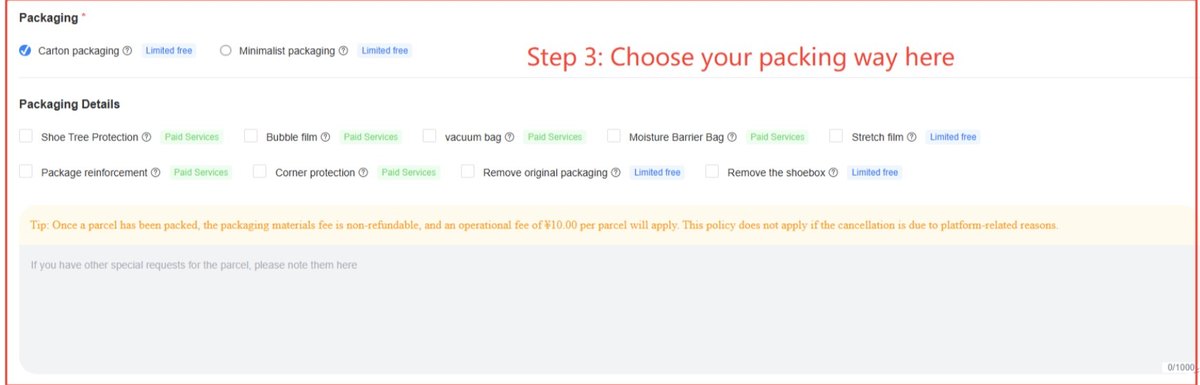
On the Warehouse page, tick the items to send together and create a parcel. The next screens ask for the address, a packaging method and a shipping line. Packaging options in Hipobuy's tutorial include shoe tree protection, bubble film, vacuum bags, corner protection, and removing the original packaging or the shoebox; some are paid and some are marked limited free.
The same screen carries a warning worth reading: after packing, cancelling costs you the packaging materials plus a ¥10.00 handling charge per parcel, unless the platform caused the cancellation. Decide what goes in before you submit.
Pick a line and pay the shipping
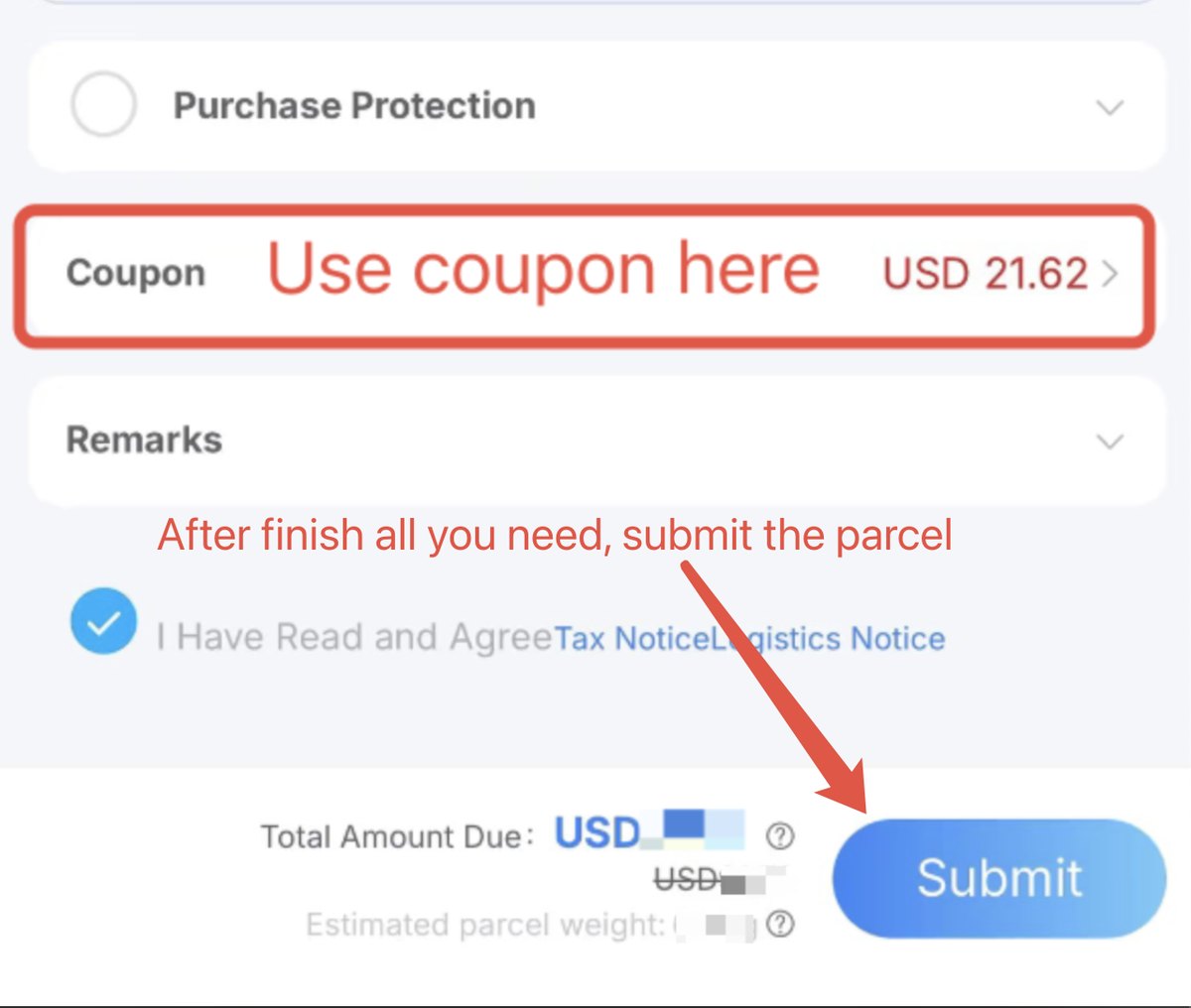
Shipping is charged on the larger of actual weight and volumetric weight for the line you choose, and you pay an estimate before the parcel leaves. After packing the warehouse weighs and measures it. A heavier result means a top-up from you; an estimate that overshot by more than one additional-weight step comes back as balance no later than 72 hours after dispatch.
If you would rather know the weight first, Hipobuy's Rehearsal Parcel service pre-packs for a fixed CNY 20 and usually reports within 24 hours. A free basic protection comes with some lines and paid protection is optional; check which applies before paying.
Sign for it and report problems in time
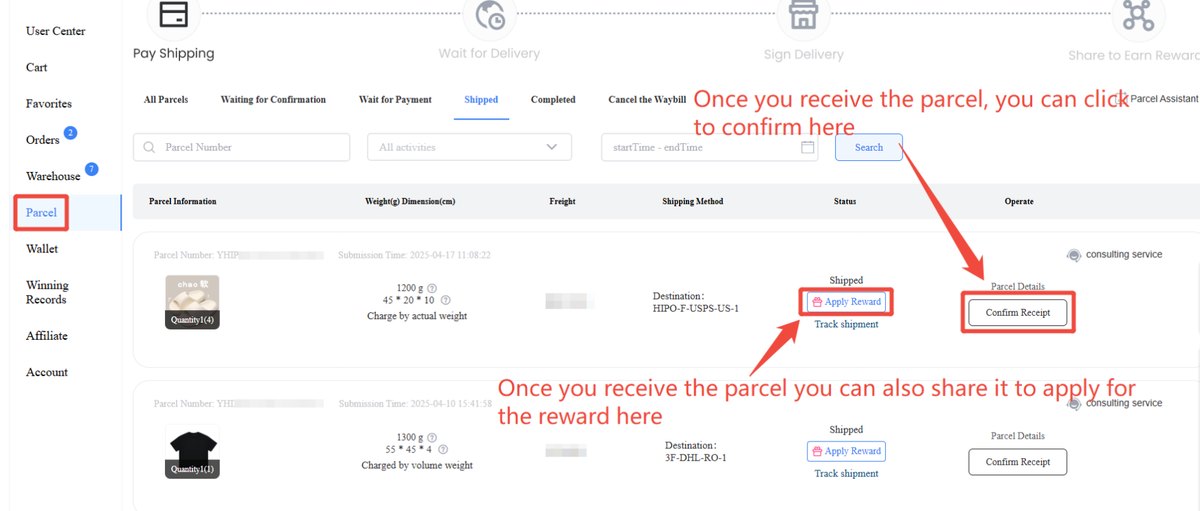
Hipobuy asks you to check the parcel in front of the courier and to sign with a remark, or refuse it, if the box is clearly damaged. If you only find damage after signing, keep the original packaging and send evidence within two working days of delivery. Missing, damaged or defective goods have to be reported within 72 hours of receiving them.
For a size complaint you need a photo of the size marking; without one, Hipobuy says the size cannot be verified. That is why several picks on this list suggest getting the size label into a warehouse photo while you can still act on it. Once everything is in order, confirm receipt on the Parcel page.
Timing from payment to dispatch
Put the official timings together and a first order runs roughly like this. Purchase within six working hours. Seller dispatch, which depends entirely on the seller. One to two days into the warehouse system, a day for inspection and photos, then as long as you need to decide, up to 90 days of free storage. Packing within a day of submitting the parcel, then the line's own delivery time.
The main delay you control is how quickly you read the photos. The five-day return window starts when the item is warehoused, not when you open the page, so check your Warehouse page daily once the seller has shipped.
Start with step one: the register page opens with our invitation code already filled in.
Register at hipobuy.com